Profit & Loss & Trading Account
Digital Bahi provides both a Profit & Loss Statement (/accounts/profit-loss) and a commodity-wise Trading Account (/accounts/trading-account) under Reports > Financial Statements to show your gross trading margin, commission income, indirect expenses, and final net profit or loss.
What is this?
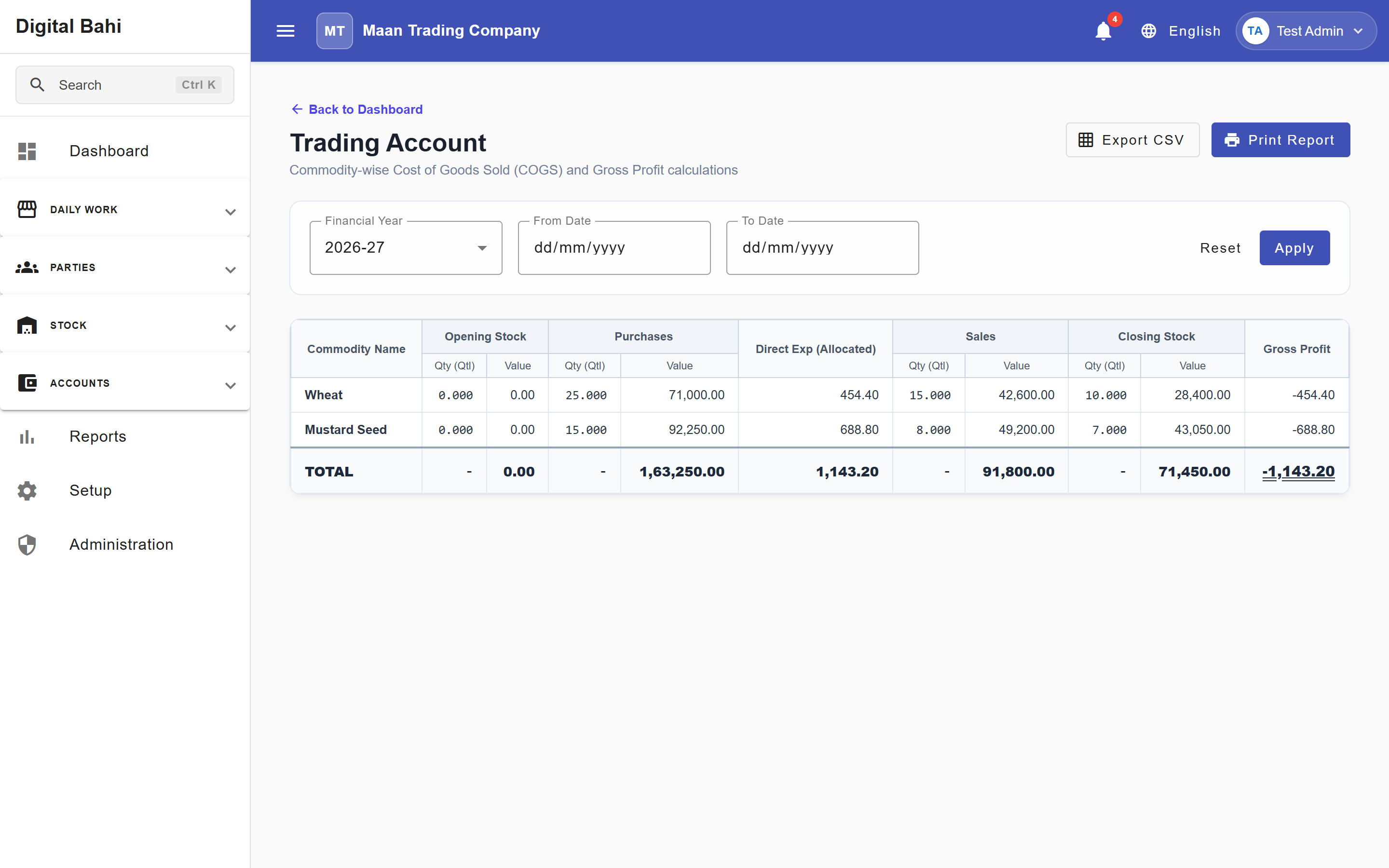
- Trading Account: Breaks down Opening Stock, Purchases, Direct Charges, Sales, Closing Stock, Cost of Goods Sold (COGS), and Gross Profit / Loss both in aggregate and per commodity (for example,
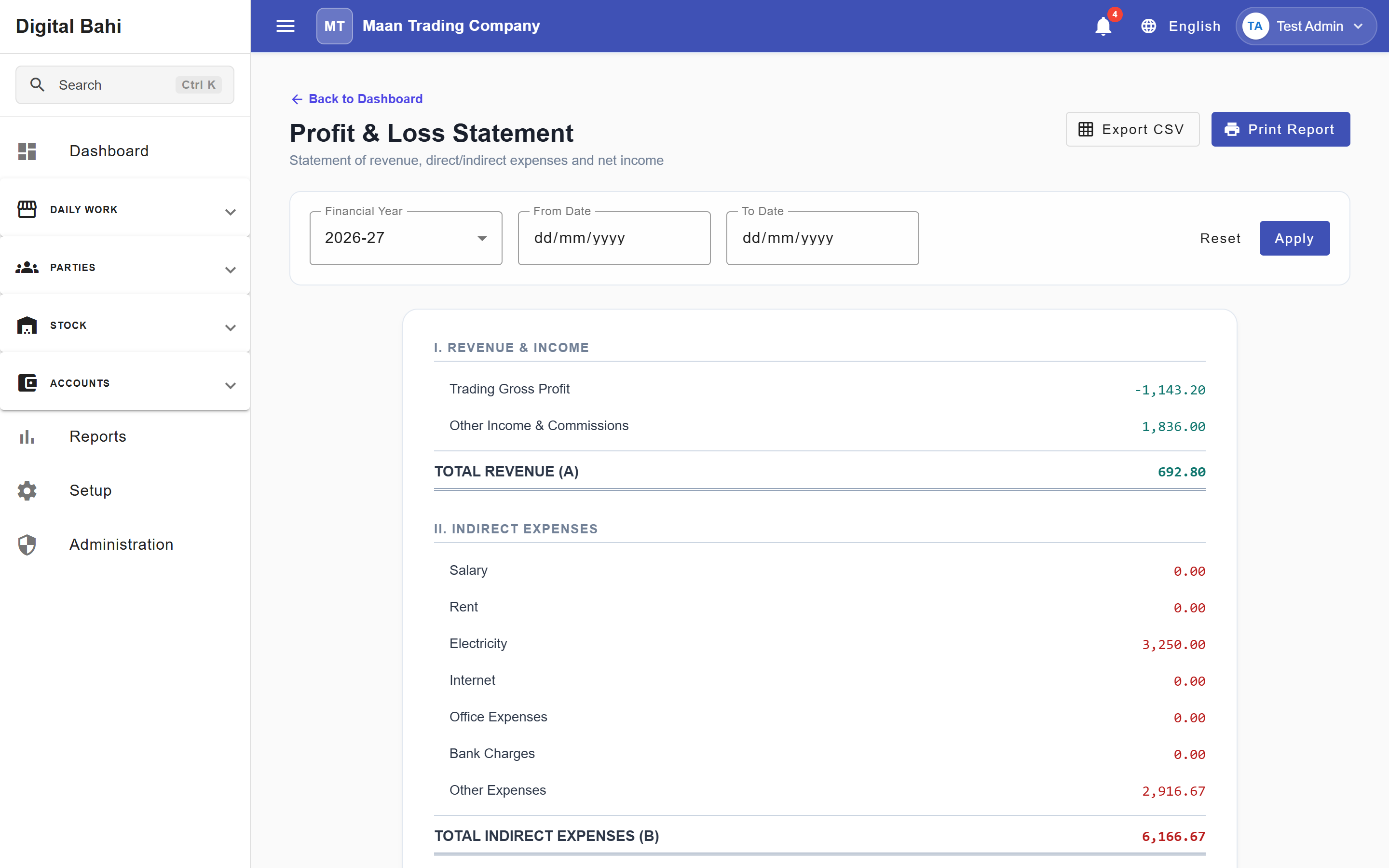
Wheat (Kanak)vs.Basmati Paddy (1121)). - Profit & Loss Statement: Combines your Trading Gross Profit with Other Income & Commissions (such as Aadat commission income) and subtracts Indirect Expenses (such as Electricity, Water, and Depreciation) to compute your final Net Profit.
When should I use it?
Use the Trading Account and Profit & Loss Statement to evaluate commodity margins and overall business profitability over a month, quarter, or financial year.
How to use the Profit & Loss Statement
- Open Reports (
/reports) and select Profit & Loss under Financial Statements (/accounts/profit-loss). - Select the Financial Year or custom From / To Date period and click Apply Filters.
- Review the four top KPI cards (Gross Profit, Total Revenue, Indirect Expenses, and Net Profit).
- Inspect the two-column statement breakdown:
- Income & Gross Profit (
Trading Gross Profit+Other Income & Commissions=Total Revenue) - Indirect Expenses (grouped by expense category, such as
Utilities ExpenseandDepreciation Expense, plus the finalNet Profittransfer line).
- Income & Gross Profit (
- Use Export CSV or Print to download or print the statement.
How to use the Trading Account
Open Reports > Financial Statements > Trading Account (/accounts/trading-account) to inspect direct trading performance and commodity-level margins:
Sections explained
Trading Gross Profit & Commodity Breakdown
Calculated as (Sales + Closing Stock) − (Opening Stock + Purchases + Direct Charges). The Trading Account also displays a Commodity Breakdown table showing Opening Stock, Purchases, Direct Charges, Closing Stock, COGS, Sales, and Gross Profit/Loss for each crop.
Other Income & Commissions
Lists operational income outside direct stock margin—most notably Commission Income (41201) generated by Aadat (2%) on Auction Sales.
Indirect Expenses
Lists overhead expenses recorded via Expenses, Fixed Asset Depreciation, and Journal Vouchers, grouped by expense category.
Net Profit
The final figure representing Total Revenue − Total Indirect Expenses. A positive amount indicates a Net Profit (transferred to Capital on the Balance Sheet); a negative amount indicates a Net Loss.